

今天要來介紹的是一個 Web Server。因為幾個月前在架這個部落格的時候,雖然覺得 actix-web 配上 actix-files 是一個不錯的選擇,但是他終究是一個後端框架,比較適合的場合是你真的需要寫一個後端的時候,如果真的是要架設一個純檔案伺服器或者完全靜態的網頁伺服器,那或許真的沒有那個必要。
所以當時我開始尋找有什麼 Rust 寫出來的網頁伺服器,沒想到就找到了這個,而這幾個月使用下來果真覺得蠻好用的,除了打包起來很小、使用起來非常容易,並且在執行時佔用資源極低、效能優異,還保留了非常多設定,可以將 server 依據自己的需求來調整。
在此附上官網:https://static-web-server.net/
Features
在這裡只會列舉一些,更多特色請自行前往官網查看。
- High performance-使用 Rust 撰寫,提供了高效非同步 I/O 、優越效能與記憶體安全
- Lightweight & portable-單個靜態執行檔僅 4MB,無需任何依賴,適合在任何 Linux 發行版和 Docker 容器中執行。
- HTTP/2 & TLS-含 HTTPS redirect 的現代協議開箱支援
- CORS & preflight-設定 origins、methods 與 headers,並包含完整 preflight 支援
- SPA fallback-對於 React、Vue、Svelte 等框架,可以在請求發生 404 時導向至
index.html - Rewrites & Redirects-包含取代功能的 Glob patterns 用以生成乾淨的 URL
- Health & Metrics-健康監控 endpoint 與內建 Prometheus 監控
- Markdown Content-可依據
Acceptheader 來選擇提供 Markdown 或 HTML 格式的內容 - Smart compression-可選的
gzip,brotli,zstd支援 - Pre-compressed files-直接從硬碟提供
.gz、.br或.zstd壓縮的檔案 - Maintenance Mode-當網頁更新時顯示自訂頁面
- First-class Docker support-多種架構且多樣的 image 可供選擇
Benchmarks
圖片來自官網,雖然是兩年前的了,但還是可以看到,其效能跟 nginx 可以說是不相上下。 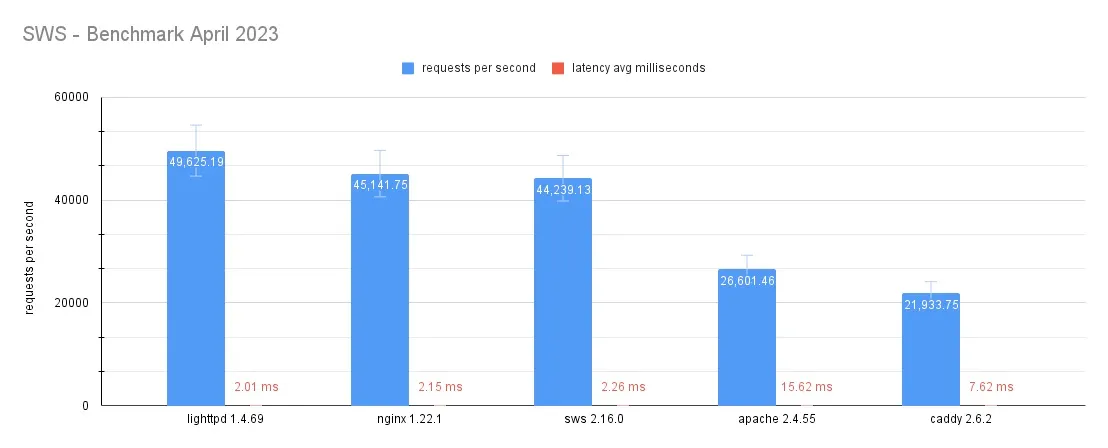
Installation and Usage
Directly Install
您可以直接前往官網下載壓縮檔
Linux 使用者可以透過 binary installer 直接安裝:
curl --proto '=https' --tlsv1.2 -sSfL https://get.static-web-server.net | shMacOS 使用者可以透過 Homebrew 安裝:
# Build from sourcebrew install static-web-server
# Just the binarybrew install static-web-server-bin
# Or build from sourcebrew install static-web-serverWindows 使用者可以透過 scoop 安裝:
scoop install static-web-server安裝完成之後,輸入以下指令即可啟動:
static-web-serverDocker Run
TIP你可以在輸入指令時直接以像
-v $HOME/my-public-dir:/public這樣的參數提來直接覆蓋預設的 root directory,也可以在此直接透過 cli 參數進行 Static Web Server 相關設定,設定部分稍後會再解釋。
輸入以下指令即可:
docker run --rm -it -p 80:8787 joseluisq/static-web-server:<tag> -g info# Ordocker run --rm -it -p 80:8787 ghcr.io/static-web-server/static-web-server:<tag> -g info<tag> 部分會依據你想使用的 image 而不同,對照如下:
- Scratch:
latest、<version> - Alpine Linux:
<version>-alpine - Debian:
<version>-debian
<version> 不知道要填多少的話可以上 Docker Hub 查,懶得查的話請直接填 2
NOTE如果不知道要選哪個的話,選擇 Debian 即可,效能會比另外兩個更好;如果優先需要 image 更小的話可以選擇 Alpine 或者 Scratch
Dockerfile
請在你的靜態網站專案下建立 Dockerfile,內容如下,若靜態網站有需要透過建置進行生成(例如 Astro 框架),請在插入以下內容之前寫上建置專案相關指令,並在 COPY 指令時記得從前一個 stage 複製靜態網站相關檔案,設定檔如果沒有可以不用複製。<tag> 部分如上方清單所示
FROM joseluisq/static-web-server:<tag>
COPY ./public ./publicCOPY ./config.toml ./config.toml
EXPOSE 8787Docker Compose
請在你的靜態網站專案下建立一個設定檔,<tag> 的部分如前面列表所示(environment 部分所做的設定等一下會再說明)
version: "3.3"
services: website: image: joseluisq/static-web-server:<tag> container_name: "website" ports: - 80:8787 restart: unless-stopped environment: # Note: those envs are customizable but also optional - SERVER_ROOT=/var/public - SERVER_CONFIG_FILE=/etc/config.toml volumes: - ./public:/var/public - ./config.toml:/etc/config.toml然後在專案資料夾下輸入以下指令即可啟動:
docker-compose up -dConfiguration
Environment Variables
更改 Static Web Server 相關設定最通用的一種方式就是修改環境變數,這方法不管是 Linux、MacOS 或者 Windows 都可以使用。
裡面個人最常會設定的環境變數如下:
SERVER_HOST、SERVER_PORT:host 與端口,預設為[::]與8787SERVER_ROOT:靜態網站檔案的根目錄,絕對或相對路徑皆可SERVER_DIRECTORY_LISTING:在請求結尾為/時啟用 directory listingSERVER_CORS_ALLOW_ORIGINS:CORS 的允許 origin 列表,預設為空,若要允許任何 host,請修改成*
其餘更多環境變數請參考官網
Command-Line Arguments
輸入以下指令即可查看
static-web-server -h內容如下,command-line arguments 基本上跟環境變數是等效的,如果指定 command-line arguments 在環境變數也有設定,會優先採用 command-line arguments。
A cross-platform, high-performance and asynchronous web server for static files-serving.
Usage: static-web-server [OPTIONS] [COMMAND]
Commands: generate Generate man pages and shell completions help Print this message or the help of the given subcommand(s)
Options: -a, --host <HOST> Host address (E.g 127.0.0.1 or ::1) [env: SERVER_HOST=] [default: ::] -p, --port <PORT> Host port [env: SERVER_PORT=] [default: 8787] -f, --fd <FD> Instead of binding to a TCP port, accept incoming connections to an already-bound TCP socket listener on the specified file descriptor number (usually zero). Requires that the parent process (e.g. inetd, launchd, or systemd) binds an address and port on behalf of static-web-server, before arranging for the resulting file descriptor to be inherited by static-web-server. Cannot be used in conjunction with the port and host arguments. The included systemd unit file utilises this feature to increase security by allowing the static-web-server to be sandboxed more completely [env: SERVER_LISTEN_FD=] --unix-socket <UNIX_SOCKET> Bind the server to a Unix Domain Socket (UDS) at the given filesystem path instead of a TCP host/port. Useful for reverse-proxy setups (e.g. nginx) on the same host where TCP/IP overhead is undesirable and filesystem-based access control is preferred. Cannot be combined with `--host`, `--port`, `--fd`, or TLS-related options. The socket file is removed on a graceful shutdown [env: SERVER_UNIX_SOCKET=] --unix-socket-mode <UNIX_SOCKET_MODE> Filesystem permission bits applied to the Unix socket file after binding, expressed in octal (e.g. `660`, `0660`, or `0o660`). When omitted the socket is created with the process umask. Only meaningful together with `--unix-socket` [env: SERVER_UNIX_SOCKET_MODE=] --unix-socket-force [<UNIX_SOCKET_FORCE>] When `true`, remove an existing socket file at `--unix-socket` before binding. This is useful when the server was previously killed abruptly and left a stale socket behind. Defaults to `false` to avoid clobbering an unrelated file [env: SERVER_UNIX_SOCKET_FORCE=] [default: false] [possible values: true, false] -n, --threads-multiplier <THREADS_MULTIPLIER> Number of worker threads multiplier that'll be multiplied by the number of system CPUs using the formula: `worker threads = number of CPUs * n` where `n` is the value that changes here. When multiplier value is 0 or 1 then one thread per core is used. Number of worker threads result should be a number between 1 and 32,768 though it is advised to keep this value on the smaller side [env: SERVER_THREADS_MULTIPLIER=] [default: 1] -b, --max-blocking-threads <MAX_BLOCKING_THREADS> Maximum number of blocking threads [env: SERVER_MAX_BLOCKING_THREADS=] [default: 512] -d, --root <ROOT> Root directory path of static files [env: SERVER_ROOT=] [default: ./public] --page50x <PAGE50X> HTML file path for 50x errors. If the path is not specified or simply doesn't exist then the server will use a generic HTML error message. If a relative path is used then it will be resolved under the root directory [env: SERVER_ERROR_PAGE_50X=] [default: ./50x.html] --page404 <PAGE404> HTML file path for 404 errors. If the path is not specified or simply doesn't exist then the server will use a generic HTML error message. If a relative path is used then it will be resolved under the root directory [env: SERVER_ERROR_PAGE_404=] [default: ./404.html] --page-fallback <PAGE_FALLBACK> A HTML file path (not relative to the root) used for GET requests when the requested path doesn't exist. The fallback page is served with a 200 status code, useful when using client routers. If the path doesn't exist then the feature is not activated [env: SERVER_FALLBACK_PAGE=] [default: ""] -g, --log-level <LOG_LEVEL> Specify a logging level in lower case. Values: error, warn, info, debug or trace [env: SERVER_LOG_LEVEL=] [default: error] --log-format <LOG_FORMAT> Specify the logging output format. Values: json (structured single-line JSON for production) or pretty (human-readable text for development) [env: SERVER_LOG_FORMAT=] [default: json] [possible values: json, pretty] --log-with-ansi [<LOG_WITH_ANSI>] Enable or disable ANSI escape codes for colors and other text formatting of the log output. Only effective when `--log-format pretty` is used [env: SERVER_LOG_WITH_ANSI=] [default: false] [possible values: true, false] --log-file <LOG_FILE> Optional filesystem path to stream log records to in addition to stderr. When set, logs are written asynchronously through a background worker thread (non-blocking I/O), so the request path is never delayed by disk writes. Missing parent directories are created on startup. ANSI escape codes are always disabled for file output regardless of `--log-with-ansi`. The file uses the format selected by `--log-format` (JSON by default). The file is opened in append mode and is not rotated by SWS, use an external tool (e.g. `logrotate`) for rotation [env: SERVER_LOG_FILE=] -c, --cors-allow-origins <CORS_ALLOW_ORIGINS> Specify an optional CORS list of allowed origin hosts separated by commas. Host ports or protocols aren't being checked. Use an asterisk (*) to allow any host [env: SERVER_CORS_ALLOW_ORIGINS=] [default: ""] -j, --cors-allow-headers <CORS_ALLOW_HEADERS> Specify an optional CORS list of allowed headers separated by commas. Default "origin, content-type". It requires `--cors-allow-origins` to be used along with [env: SERVER_CORS_ALLOW_HEADERS=] [default: "origin, content-type, authorization"] --cors-expose-headers <CORS_EXPOSE_HEADERS> Specify an optional CORS list of exposed headers separated by commas. Default "origin, content-type". It requires `--cors-expose-origins` to be used along with [env: SERVER_CORS_EXPOSE_HEADERS=] [default: "origin, content-type"] -t, --tls [<TLS>] Enable TLS/HTTPS support. Requires --tls-cert and --tls-key [env: SERVER_TLS=] [default: false] [possible values: true, false] --tls-cert <TLS_CERT> Specify the file path to the TLS certificate [env: SERVER_TLS_CERT=] --tls-key <TLS_KEY> Specify the file path to the TLS private key [env: SERVER_TLS_KEY=] --http2 [<HTTP2>] Enable HTTP/2 protocol support. Requires TLS to be enabled (--tls) [env: SERVER_HTTP2=] [default: false] [possible values: true, false] --https-redirect [<HTTPS_REDIRECT>] Redirect all requests with scheme "http" to "https" for the current server instance. Requires TLS to be enabled (--tls) [env: SERVER_HTTPS_REDIRECT=] [default: false] [possible values: true, false] --https-redirect-host <HTTPS_REDIRECT_HOST> Canonical host name or IP of the HTTPS server. It depends on "https_redirect" to be enabled [env: SERVER_HTTPS_REDIRECT_HOST=] [default: localhost] --https-redirect-from-port <HTTPS_REDIRECT_FROM_PORT> HTTP host port where the redirect server will listen for requests to redirect them to HTTPS. It depends on "https_redirect" to be enabled [env: SERVER_HTTPS_REDIRECT_FROM_PORT=] [default: 80] --https-redirect-from-hosts <HTTPS_REDIRECT_FROM_HOSTS> List of host names or IPs allowed to redirect from. HTTP requests must contain the HTTP 'Host' header and match against this list. It depends on "https_redirect" to be enabled [env: SERVER_HTTPS_REDIRECT_FROM_HOSTS=] [default: localhost] --index-files <INDEX_FILES> List of files that will be used as an index for requests ending with the slash character (‘/’). Files are checked in the specified order [env: SERVER_INDEX_FILES=] [default: index.html] -x, --compression [<COMPRESSION>] Gzip, Deflate, Brotli or Zstd compression on demand determined by the Accept-Encoding header and applied to text-based web file types only [env: SERVER_COMPRESSION=] [default: true] [possible values: true, false] --compression-level <COMPRESSION_LEVEL> Compression level to apply for Gzip, Deflate, Brotli or Zstd compression [env: SERVER_COMPRESSION_LEVEL=] [default: default] [possible values: fastest, best, default] --compression-static [<COMPRESSION_STATIC>] Look up the pre-compressed file variant (`.gz`, `.br` or `.zst`) on disk of a requested file and serves it directly if available. The compression type is determined by the `Accept-Encoding` header [env: SERVER_COMPRESSION_STATIC=] [default: true] [possible values: true, false] -z, --directory-listing [<DIRECTORY_LISTING>] Enable directory listing for all requests ending with the slash character (‘/’) [env: SERVER_DIRECTORY_LISTING=] [default: false] [possible values: true, false] --directory-listing-order <DIRECTORY_LISTING_ORDER> Specify a default code number to order directory listing entries per `Name`, `Last modified` or `Size` attributes (columns). Code numbers supported: 0 (Name asc), 1 (Name desc), 2 (Last modified asc), 3 (Last modified desc), 4 (Size asc), 5 (Size desc). Default 6 (unordered) [env: SERVER_DIRECTORY_LISTING_ORDER=] [default: 6] --directory-listing-format <DIRECTORY_LISTING_FORMAT> Specify a content format for directory listing entries. Formats supported: "html" or "json". Default "html" [env: SERVER_DIRECTORY_LISTING_FORMAT=] [default: html] [possible values: html, json] --directory-listing-download=<DIRECTORY_LISTING_DOWNLOAD> Specify list of enabled format(s) for directory download. Format supported: `targz`. Default to empty list (disabled) [env: SERVER_DIRECTORY_LISTING_DOWNLOAD=] [possible values: targz] --security-headers [<SECURITY_HEADERS>] Enable security headers by default when TLS feature is activated. Headers included: "Strict-Transport-Security: max-age=63072000; includeSubDomains; preload" (2 years max-age), "X-Frame-Options: DENY" and "Content-Security-Policy: frame-ancestors 'self'" [env: SERVER_SECURITY_HEADERS=] [default: true] [possible values: true, false] -e, --cache-control-headers [<CACHE_CONTROL_HEADERS>] Enable cache control headers for incoming requests based on a set of file types. The file type list can be found on `src/control_headers.rs` file [env: SERVER_CACHE_CONTROL_HEADERS=] [default: true] [possible values: true, false] --etag [<ETAG>] Enable weak `ETag` headers (`W/"<mtime>-<size>"`) and full conditional request handling (`If-None-Match`, `If-Match`, `If-Range`). Composes with `--cache-control-headers`; emits validators on every static-file response so clients can revalidate hot HTML even when long `max-age` is configured elsewhere [env: SERVER_ETAG=] [default: true] [possible values: true, false] --basic-auth <BASIC_AUTH> It provides The "Basic" HTTP Authentication scheme using credentials as "user-id:password" pairs. Password must be encoded using the "BCrypt" password-hashing function [env: SERVER_BASIC_AUTH=] [default: ""] -q, --grace-period <GRACE_PERIOD> Defines a grace period in seconds after a `SIGTERM` signal is caught which will delay the server before to shut it down gracefully. The maximum value is 255 seconds [env: SERVER_GRACE_PERIOD=] [default: 0] -w, --config-file <CONFIG_FILE> Server TOML configuration file path [env: SERVER_CONFIG_FILE=] [default: ./sws.toml] --log-remote-address [<LOG_REMOTE_ADDRESS>] Log incoming requests information along with its remote address if available using the `info` log level [env: SERVER_LOG_REMOTE_ADDRESS=] [default: false] [possible values: true, false] --log-x-real-ip [<LOG_X_REAL_IP>] Log the X-Real-IP header for remote IP information [env: SERVER_LOG_X_REAL_IP=] [default: false] [possible values: true, false] --log-forwarded-for [<LOG_FORWARDED_FOR>] Log the X-Forwarded-For header for remote IP information [env: SERVER_LOG_FORWARDED_FOR=] [default: false] [possible values: true, false] --trusted-proxies <TRUSTED_PROXIES> List of IPs to use X-Forwarded-For from. The default is to trust all [env: SERVER_TRUSTED_PROXIES=] --redirect-trailing-slash [<REDIRECT_TRAILING_SLASH>] Check for a trailing slash in the requested directory URI and redirect permanently (308) to the same path with a trailing slash suffix if it is missing [env: SERVER_REDIRECT_TRAILING_SLASH=] [default: true] [possible values: true, false] --include-hidden [<INCLUDE_HIDDEN>] Include hidden files/directories (dotfiles), allowing them to be served and listed in auto HTML index pages (directory listing). Disabled by default; hidden files return `404 Not Found` [env: SERVER_INCLUDE_HIDDEN=] [default: false] [possible values: true, false] --follow-symlinks [<FOLLOW_SYMLINKS>] Follow symbolic links when serving files or directories. Disabled by default; requests whose path contains any symlink component return `403 Forbidden` [env: SERVER_FOLLOW_SYMLINKS=] [default: false] [possible values: true, false] --use-relative-root [<USE_RELATIVE_ROOT>] Resolve the web root directory at request time rather than at startup, allowing symlinked root directories to be swapped at runtime [env: SERVER_USE_RELATIVE_ROOT=] [default: false] [possible values: true, false] --accept-markdown [<ACCEPT_MARKDOWN>] Enable markdown content negotiation. When a client sends Accept: text/markdown, serve .md or .html.md files if available [env: SERVER_ACCEPT_MARKDOWN=] [default: false] [possible values: true, false] --text-charset [<TEXT_CHARSET>] Set a default `charset=utf-8` parameter on limited set of `text` responses that don't already have one [env: SERVER_TEXT_CHARSET=] [default: true] [possible values: true, false] --health [<HEALTH>] Add a /health endpoint that doesn't generate any log entry and returns a 200 status code. This is especially useful with Kubernetes liveness and readiness probes [env: SERVER_HEALTH=] [default: false] [possible values: true, false] --metrics [<METRICS>] Enable the /metrics endpoint that exposes Prometheus metrics for HTTP requests, connections, and latency [env: SERVER_METRICS=] [default: false] [possible values: true, false] --maintenance-mode [<MAINTENANCE_MODE>] Enable the server's maintenance mode functionality [env: SERVER_MAINTENANCE_MODE=] [default: false] [possible values: true, false] --maintenance-mode-status <MAINTENANCE_MODE_STATUS> Provide a custom HTTP status code when entering into maintenance mode. Default 503 [env: SERVER_MAINTENANCE_MODE_STATUS=] [default: 503] --maintenance-mode-file <MAINTENANCE_MODE_FILE> Provide a custom maintenance mode HTML file. If not provided then a generic message will be displayed [env: SERVER_MAINTENANCE_MODE_FILE=] [default: ""] -V, --version Print version info and exit -h, --help Print help (see more with '--help')而 Windows 的話會有以下指令和選項:
-s, --windows-service <windows-service> Run the web server as a Windows Service [env: SERVER_WINDOWS_SERVICE=] [default: false]
SUBCOMMANDS: help Prints this message or the help of the given subcommand(s) install Install a Windows Service for the web server uninstall Uninstall the current Windows ServiceTOML
讀取 TOML 設定預設是關閉的,若要開啟,可以透過 -w, --config-file 參數或者透過設定 SERVER_CONFIG_FILE 環境變數提供路徑。設定檔的優先度是高於前兩者的,若設定檔中某設定值在前兩者之一有提供,會優先採用設定檔的設定值。
以下摘自官網,裡面有所有設定與其預設值:
[general]
#### Address & Root dirhost = "::"port = 8787root = "./public"
#### Logginglog-level = "error"log-format = "json"
#### Cache Control headerscache-control-headers = true
#### Auto Compressioncompression = truecompression-level = "default"
#### Error pages# Note: If a relative path is used then it will be resolved under the root directory.page404 = "./404.html"page50x = "./50x.html"
#### HTTP/2 + TLShttp2 = falsehttp2-tls-cert = ""http2-tls-key = ""https-redirect = falsehttps-redirect-host = "localhost"https-redirect-from-port = 80https-redirect-from-hosts = "localhost"
#### CORS & Security headers# security-headers = true# cors-allow-origins = ""
#### Directory listingdirectory-listing = false
#### Directory listing sorting codedirectory-listing-order = 1
#### Directory listing content formatdirectory-listing-format = "html"
#### Directory listing download formatdirectory-listing-download = []
#### Basic Authentication# basic-auth = ""
#### File descriptor binding# fd = ""
#### Worker threadsthreads-multiplier = 1
#### Grace period after a graceful shutdowngrace-period = 0
#### Page fallback for 404s# page-fallback = ""
#### Log request Remote Address if availablelog-remote-address = false
#### Log real IP from X-Forwarded-For header if availablelog-forwarded-for = false
#### IPs to accept the X-Forwarded-For header from. Empty means alltrusted-proxies = []
#### Redirect to trailing slash in the requested directory uriredirect-trailing-slash = true
#### Use relative root (skip root canonicalization at startup)use-relative-root = false
#### Check for existing pre-compressed filescompression-static = true
#### Health-check endpoint (GET or HEAD `/health`)health = false
#### Markdown content negotiationaccept-markdown = false
#### Default charset for text responses (enabled by default)# text-charset = false
#### List of index files# index-files = "index.html, index.htm"#### Maintenance Mode
maintenance-mode = false# maintenance-mode-status = 503# maintenance-mode-file = "./maintenance.html"
### Windows Only
#### Run the web server as a Windows Service# windows-service = false
[advanced]
#### HTTP Headers customization (examples only)
#### a. Oneline version# [[advanced.headers]]# source = "**/*.{js,css}"# headers = { Access-Control-Allow-Origin = "*" }
#### b. Multiline version# [[advanced.headers]]# source = "/index.html"# [advanced.headers.headers]# Cache-Control = "public, max-age=36000"# Content-Security-Policy = "frame-ancestors 'self'"# Strict-Transport-Security = "max-age=63072000; includeSubDomains; preload"
#### c. Multiline version with explicit key (dotted)# [[advanced.headers]]# source = "**/*.{jpg,jpeg,png,ico,gif}"# headers.Strict-Transport-Security = "max-age=63072000; includeSubDomains; preload"
### URL Redirects (examples only)
# [[advanced.redirects]]# source = "**/*.{jpg,jpeg}"# destination = "/images/generic1.png"# kind = 301
# [[advanced.redirects]]# source = "/index.html"# destination = "https://static-web-server.net"# kind = 302
### URL Rewrites (examples only)
# [[advanced.rewrites]]# source = "**/*.{png,ico,gif}"# destination = "/assets/favicon.ico"## Optional redirection# redirect = 301
# [[advanced.rewrites]]# source = "**/*.{jpg,jpeg}"# destination = "/images/sws.png"
### Virtual Hosting
# [[advanced.virtual-hosts]]## But if the "Host" header matches this...# host = "sales.example.com"## ...then files will be served from here instead# root = "/var/sales/html"
# [[advanced.virtual-hosts]]# host = "blog.example.com"# root = "/var/blog/html"
# [advanced.memory-cache]# capacity = 100# ttl = 1800 # 30 minutes# tti = 300 # 5 minutes# max-file-size = 8192 # 8 MiBDockerfile Examples
File Server
由於 Scratch image 是沒有辦法透過 CMD 下終端機指令的,而它預設 ./public 資料夾下已經有 index.html 檔案,所以為了方便起見,我們換資料夾存放檔案,並且透過 SERVER_ROOT 變數將根目錄路徑切換過去,這樣即可保證顯示資料夾目錄。
FROM joseluisq/static-web-server:2WORKDIR /COPY ./assets ./assetsENV SERVER_PORT=3000ENV SERVER_CORS_ALLOW_ORIGINS="*"ENV SERVER_DIRECTORY_LISTING=trueENV SERVER_ROOT="./assets"
EXPOSE 3000Astro Static Website
這個其實就是我目前架本部落格在用的 Dockerfile 檔案。由於需要先生成靜態網頁,所以需要採用 multi-stage build 的方式,先安裝相關模組、生成靜態網頁,之後再透過 Static Web Server 的 image 建立新的 stage,並從前一個 stage 將生成的靜態網站檔案複製進預設的根目錄資料夾進行覆蓋。
FROM oven/bun:alpine AS builder
WORKDIR /appCOPY . .
RUN bun installRUN bun run build
FROM joseluisq/static-web-server:latest
WORKDIR /
COPY --from=builder /app/dist/ ./public/WARNING如果您的專案被限制使用
pnpm(例如 fuwari),詳細請參考 pnpm 官方文件的 Working with Docker
NOTE如果你想要你的 fuwari 專案「脫 pnpm 入 bun」可參考此文章的「Preparation」一節